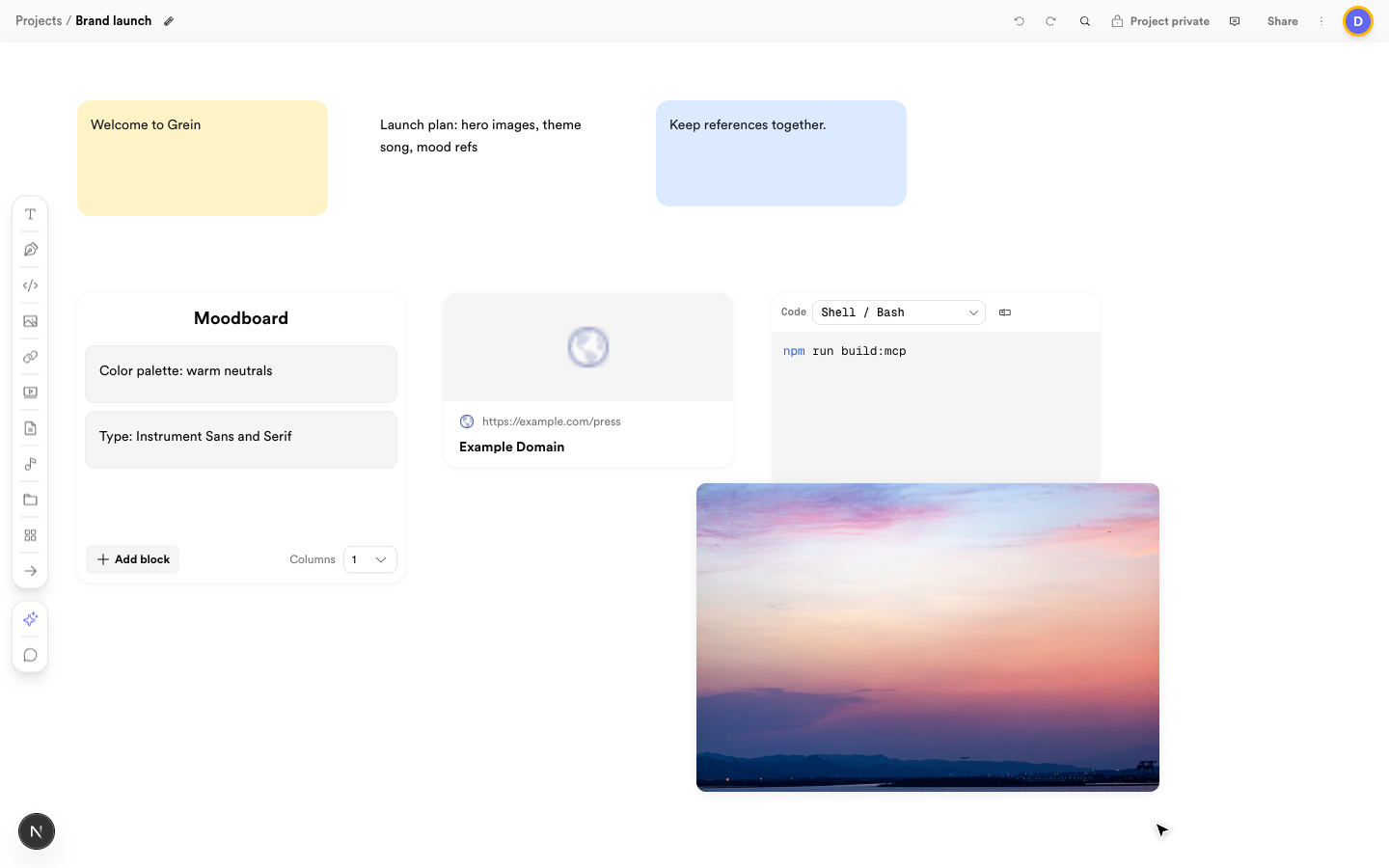
Keep boards readable as they grow. An organized Grein board with a composite moodboard and aligned blocks A readable board: titled composite, aligned rows, mixed blocks

Group with composites

Use a composite block to group related notes or media under one title. Its rows can be reordered and resized individually, and each text row can have its own color.

Arrange in rows and columns

Drag blocks into neat rows or columns with consistent spacing. Pan and zoom to step back and check balance — if you have to hunt for something, split it onto a sub-board.

Copy, duplicate, delete

Right-click a block for Copy, Duplicate, or Delete, or use Ctrl/Cmd+C and Ctrl/Cmd+V. Copy works across boards and across projects: copy on one board, paste on another. Right-click empty canvas to paste at that spot. Duplicate stays on the same board.

Undo and redo

Header undo/redo steps through canvas changes. Saving happens automatically — the header indicator shows while an edit is on its way.

Appearance

Switch light, dark, or system theme in Settings under Appearance. Note colors you pick stay the same in either theme; untouched notes follow the theme surface.